


1.Select ⚙️Calibration to calibrate sticks / triggers / motion
2.Follow the on-screen instructions to rotate sticks and press triggers.
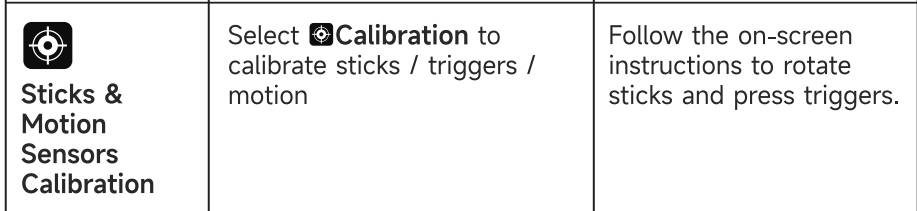
Q1:How to Calibrate the Controller stick/trigger/gyroscope? Stick/gyroscope is drifting and(or) trigger is not working, what to do?
1.Select ⚙️Calibration to calibrate sticks / triggers / motion
2.Follow the on-screen instructions to rotate sticks and press triggers.
Q2:How to Update?
Q3:How to Connect to Devices
● PC(Dock)
1.Connect Dock to PC via USB Cable.
2.Plug dongle into Dock.
3.Screen Menu: Mode-->PC-->Receiver.
【Note】If the 2.4G receiver doesn't connect, hold button on Receiver (3s) until Green Flash.
On Controller Screen Menu, select Mode --> PC --> Receiver to force pair.
● PC (Wireless dongle)
1. Plug dongle into PC.
2. Screen Menu: 📺 Mode --> PC --> Receiver.

● PC (Bluetooth)
1. Screen Menu: 📺 Mode → PC → Bluetooth.
2. PC: Pair "Xbox Wireless Controller".
● Mobile (BT)
1. Screen Menu: ⚙️ Mode → Android/iOS → Bluetooth.
2. Turn on Bluetooth on Mobile/Tablet, and pair with "Xbox Wireless Controller".
● Switch
1. Screen Menu: 🎮 Mode --> Switch.
2. Go to Controllers -> Change Grip/Order on console and wait for connection.
【Note】
- Low Battery: The RGB red light is flashing.
- Charging via Cable: The RGB lights will stay breathing in the current mode color.
Lights turn off when fully charged.
- Charging via Dock: Both the Controller RGB and Dock LED will breathe/pulse.
Lights turn off when fully charged.
Q4:How to set up/disable the turbo/auto-fire function?
● Manual-Turbo: Hold M & [Button].
● Auto-Turbo: Hold M & [Button] again.
● Clear Turbo: Hold [Button] & press M again.
● Turbo Speed: Hold M & Right Sticks Up/Down (3-level adjustable).
● Supported Buttons: A / B / X / Y / LB / RB / LT / RT / D-Pad / M1/ M2 / M3 / M4
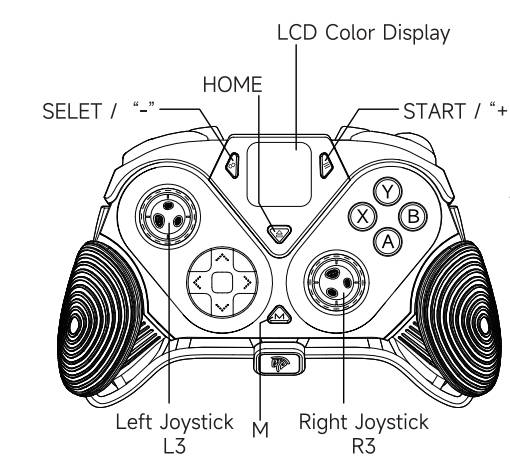
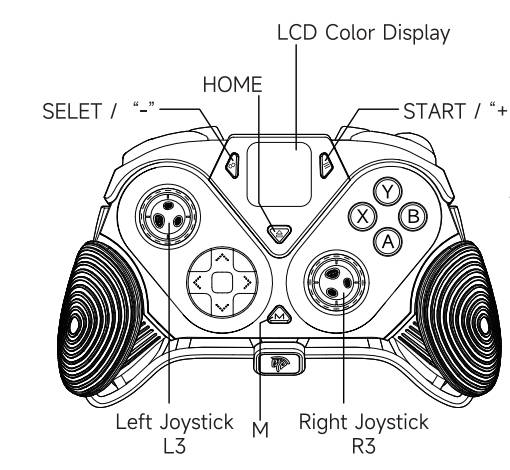
Q5:M1/M2/M3/M4 Programmable Button Setup/Macro setting
Macro setting(M1/M2/M3/M4)
1. Select ⚙ Config Scheme -> Buttons
2. Press the M Button to confirm and return to the previous menu
3.visually Map buttons / Macro recording on screen.

Q6:How to restore the controller to factory default settings?
● Restore Factory
While powered on, long-press the R3 & HOME buttons.
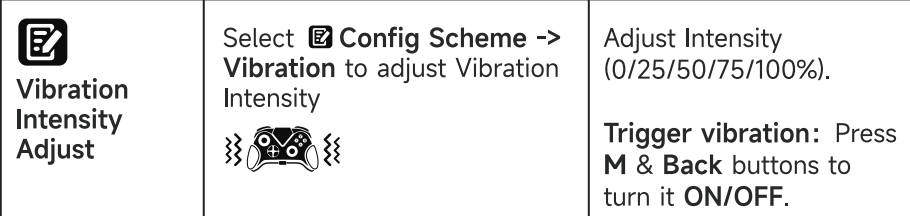
Q7:How to adjust the vibration/rumble intensity?
Select ⚙ Config Scheme -> Vibration to adjust Vibration Intensity
Trigger vibration: Press M & Back buttons to turn it ON/OFF.
Adjust Intensity (0/25/50/75/100%).
a.Download
b.Testing Tools