


- 1. Connect the controller to your device.
- 2. Hold the View and Menu buttons for 2 seconds.
- 3. Rotate both sticks third times and press both triggers three times.
- 4. Press Menu again.
- 【Note】The controller's LED will flash white slowly to indicate that calibration mode has been entered.
- Calibration is complete when the LED flashes three times and then goes out.
- Click here to watch calibration tutorial
Questions about EasySMX® M20 Controller
Ⅰ.FAQ
Q1:How to Calibrate the Controller? Stick is drifting and(or) trigger is not working, what to do?
Q2:How to Update?
Connect your mobile device to the GeekGamer 5.0 app. Tap the controller icon > Device Information > Device Update. This will update the firmware to the latest version. Once the device has been successfully recognised, tap Confirm, wait for the progress bar to complete, and then reconnect. (Please do not disconnect during the update process.)
【Note】
a. The app supports both upgrading and downgrading (you can downgrade to an older version).
b. After the update, you will need to restore the factory settings and recalibrate the device.
If you have any other questions, please feel fee to contact us.
Q3:How to Connect to Devices
1. HID Mode: Hold FN + B Switch to yellow light. Recommended for native Android games.
2. Xinput Mode: Hold FN + X Switch to white light.Used for Streaming, Console Ports, and Vibration feedback.
3. Mapping: Hold FN + Y Switch to blue light.Don’t natively support Android games; the initial setup requires mapping via the app.
For Bluetooth Android Users
1. Xbox Mode: Hold FN + RB Switch to red light.
2. Mapping: Hold FN + RT Switch to purple light.
Note: When wired mode is unavailable on Android devices, this Bluetooth mode may be utilised.
For iPhone Users
1. PS Mode:Hold FN + Menu Switch to pink light.Used for Console Ports and Vibration feedback.
2. Wired iOS Mode: Hold FN + A Switch to green light.For native games on iPhone 15 and newer models.
If you have any other question, please feel free to let me know! Have a good day."
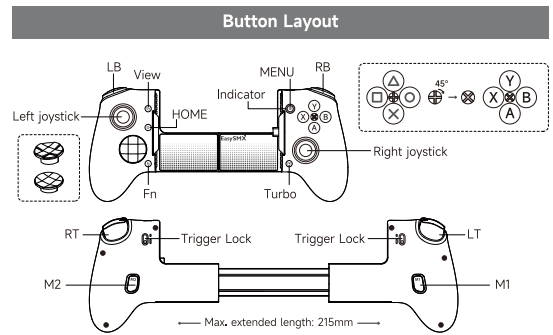
Q4:How to set up the turbo/auto-fire function? Why the home light is blinking red when I press a button?
1. Turbo: Hold Turbo & [Button]. (LED flashes red on press).
2. Auto-Turbo: Hold Turbo & [Button] again
3. Clear Turbo: Hold [Button] & press Turbo once.
4. Turbo Speed: Hold TURBO & D-pad Left/Right (10/20/30/40 Hz).
If turbo function is set on a button, the home light will flash red when you press the button.
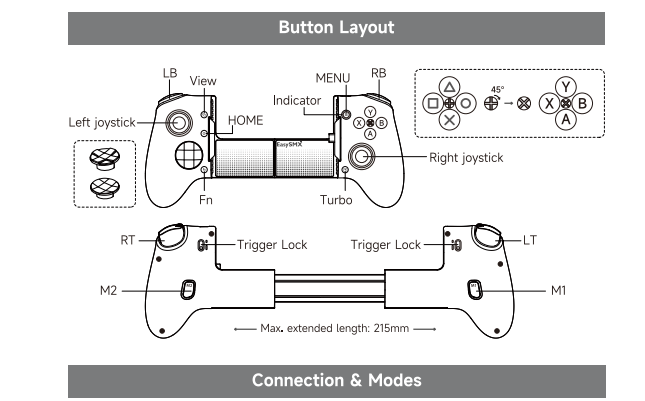
Q5:Programmable Button Setup
1. Record: Hold FN & M1 (or M2) until Pink LED stays Solid. Press the desired button(s). Press M1 (or M2) again to save.
2. Clear: Hold FN & M1 (or M2) until Pink LED is Solid, then press M1 (or M2) again immediately.
If you have any other question, please feel free to let me know! Have a good day."
Q6:How to restore the controller to factory default settings?
Long press "FN" + “View” + ”Menu” for 3 seconds. The controller's LED will flash red 3 seconds
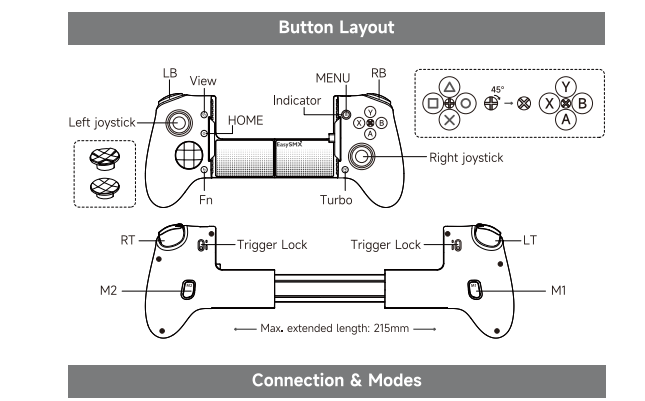
Q7:How to adjust the vibration/rumble intensity?
Press the FN button and move the R-Stick Up or Down to Adjusts intensity from 0 to 10.
And The vibration function is dependent on the game's native support.
Q7:Streaming platform configuration guide
1. For PS4/5: Hold FN + A
2. For Xbox: Hold FN + Menu / FN + X
3. For PC: Hold FN + X
For iOS User
1. For PS4/5: Hold FN + A
2. For Xbox: Hold FN + Menu
3. For PC: Hold FN + A
Q9:What's In The Box
M20 Type-C:
M20 Controller*1
User Manual*1
USB Charging Cable *1
Interchangeable D-Pad *1
Interchangeable Silicone Caps *1
Profile Switch Keychain*1
Ⅱ.Manual
Ⅲ.Firmware for M20
a.Download
Firmware update step:
1.Connect your mobile device to the GeekGamer 5.0 app. 2.Tap the controller icon > Device Information > Device Update.
This will update the firmware to the latest version. Once the device has been successfully recognised, tap Confirm, wait for the progress bar to complete, and then reconnect. (Please do not disconnect during the update process.)
【Note】
a. The app supports both upgrading and downgrading (you can downgrade to an older version).
b. After the update, you will need to restore the factory settings and recalibrate the device.
If you have any other questions, please feel fee to contact us."
b.Testing Tools